for Claude Code · Codex · any terminal agent
Lock your Mac, not your AI agents
The macOS lock screen turns your display black — and your hour-long agent run invisible. VibeLock keeps Claude Code, Codex and your terminal on screen while every keystroke, click and app is locked behind Touch ID.
✳ Refactoring auth middleware…
⎿ Updated src/middleware/auth.ts (+142 −38)
✳ Running test suite…
⎿ 47 passed, 0 failed (12.3s)
✳ Writing migration for sessions table
Input locked
Agents still running · unlock with Touch ID
The problem
Vibe coding created a lock-screen dilemma macOS never solved
Agents run long. You don't sit still.
A Claude Code refactor takes 25 minutes. You want coffee, a standup, a walk — not a babysitting shift in front of a terminal.
The lock screen hides everything.
⌃⌘Q protects your Mac by turning the display black. Now you can't glance over and see whether your agent finished, stalled, or is waiting on a permission prompt.
An open terminal is full machine access.
Leave it unlocked instead and anyone walking by can type into your shell, read your codebase, or send prompts as you. One curious coworker is all it takes.
How it works
A lock screen that behaves like a window, not a wall
01
Pick what stays visible
Terminal, iTerm, Warp, Ghostty, Claude, ChatGPT and VS Code are allowed out of the box. Toggle any app in the menu bar — everything else gets hidden the moment you lock.
02
Lock from the menu bar
One click. Every other app disappears behind an opaque backdrop, the display stays awake, and a system-wide input firewall swallows every keystroke, click, scroll and shortcut — Spotlight and Force Quit included.
03
Watch your agents from anywhere
Your terminal keeps streaming agent output in full view. Walk to the kitchen, glance back, see exactly where the run is. Anyone who touches the keyboard just gets a Touch ID prompt.
04
Unlock in one touch
Touch ID or your Mac login password — verified locally, never sent anywhere. Everything hidden comes back exactly as you left it, fullscreen windows included.
Two levels of trust
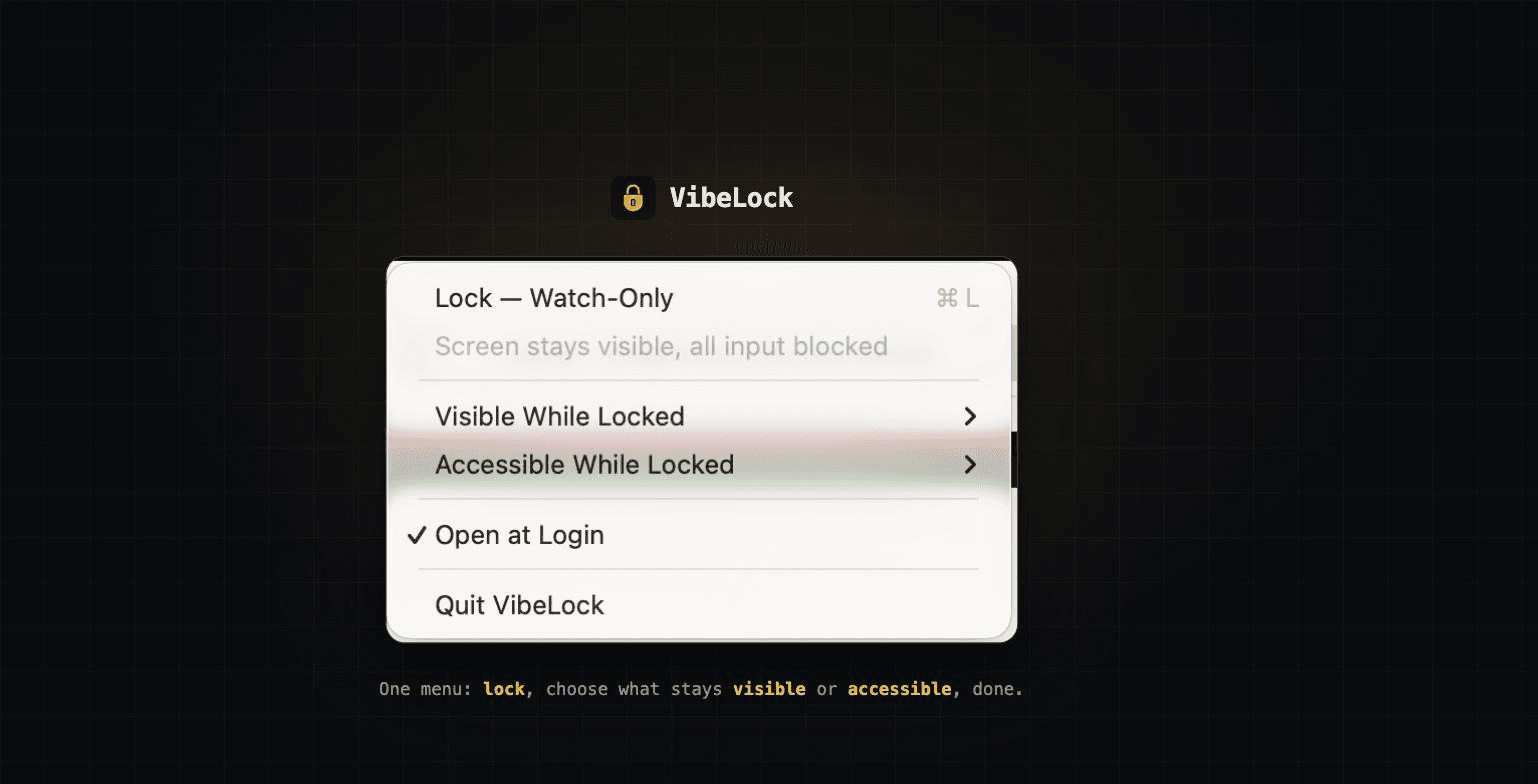
Visible apps you can watch. Accessible apps you can use.
Every app on your Mac falls into one of three buckets while VibeLock is engaged — you choose the buckets from the menu bar, per app.
Visible While Locked
Stays on screen so you can watch it — but every keystroke, click and scroll aimed at it is swallowed. Look, don't touch.
- → your terminal streaming a Claude Code run
- → a dashboard or video that should keep playing
- → pre-allowed: Terminal, iTerm2, Warp, Ghostty, Claude, VS Code…
Accessible While Locked
Can also be used while everything else stays locked — typing, clicking, scrolling all work, in that app only. Marking an app accessible automatically makes it visible.
- → let a colleague approve an agent prompt at your desk
- → keep one chat or note-taking app usable in a pair session
- → empty by default — watch-only is the safe baseline
Everything else — every app in neither list — is hidden behind an opaque backdrop the moment you lock, kept hidden if it tries to come back, and covered by the shield on every Space. ⌘Q is blocked across the board, so even an accessible app can't be quit.
On your screen
See it in action
Built for the walk-away
Everything a watch-only lock needs to actually hold
Everything else vanishes
Slack, Chrome, your email — hidden and kept hidden. Desktop files are covered too. Even fullscreen apps on other Spaces get an opaque shield.
A real input firewall
A system-wide event tap swallows keys, clicks, scrolls and gestures. Spotlight, Force Quit and ⌘Q are blocked so nobody can kill your agents.
Unlocks like your Mac
Touch ID first, your macOS login password as fallback — verified locally against your account. No new passwords to invent or forget.
Two trust levels per app
"Visible" apps can be watched but not touched. "Accessible" apps can be typed in while locked — for pair sessions where a colleague approves a prompt.
Display stays awake
VibeLock holds the display awake while locked, so a glance across the office always shows live agent output — not a sleeping screen.
Native, tiny, notarized
A 2 MB Swift menu bar app. No Electron, no accounts, no network calls. Signed and notarized by Apple.
Pricing
One coffee. Zero subscriptions.
VibeLock costs less than the drink you'll fetch while your agents keep working. Buy once, use forever, on your personal Mac.
Secure checkout via Whop · instant download
Pairs well with AI Done Now or NotchFit: get alerted when your agent finishes, then lock up and walk away.
- Lifetime license — pay once
- All future updates included
- Watch-only and accessible app modes
- Touch ID + local password unlock
- Signed & notarized by Apple
- 7-day money-back guarantee
FAQ
Questions people actually ask
How is this different from the macOS lock screen?+
The built-in lock screen (⌃⌘Q) blanks your display, so you can't see whether your agent run finished or stalled. VibeLock keeps your chosen apps visible on screen while blocking all keyboard, mouse and trackpad input — and hiding every other app.
Can someone just quit VibeLock or use Spotlight?+
No. While locked, VibeLock blocks Spotlight (⌘Space), Force Quit (⌘⌥Esc) and ⌘Q system-wide, refuses to quit, and re-hides any blocked app that tries to reappear. A watchdog re-arms the input firewall if macOS ever disables it.
What unlocks it?+
Touch ID, or your Mac login password typed into VibeLock's own shield — verified locally through macOS (OpenDirectory). Nothing is stored or sent anywhere.
Which apps can stay visible?+
Anything you like. Terminal, iTerm2, Warp, Ghostty, kitty, Alacritty, WezTerm, Claude desktop, ChatGPT/Codex and VS Code are pre-allowed; toggle any app from the menu bar. You can also mark specific apps "accessible" so they can be used while everything else stays locked.
Does it work with fullscreen apps and multiple Spaces?+
Yes. Fullscreen windows of blocked apps stay exactly where they are but get covered by an opaque shield if anyone swipes to them. Your visible apps work across all Spaces and displays.
Is it safe to install?+
VibeLock is a native Swift app, signed with an Apple Developer ID and notarized by Apple. It makes no network calls, has no accounts, and needs only the Accessibility permission that input blocking requires. macOS will ask you to grant it on first lock.
What do I get for $10?+
A lifetime license for your personal Mac, all future updates, and instant download after checkout. If it's not for you, email puspalatha@hodolist.com within 7 days for a full refund.